How to add an invert button color hover effect on Squarespace
Learn how to implement an invert button color hover effect on Squarespace using custom CSS to create a bold, high-contrast interaction that captures attention.
In this tutorial:
Introduction
What is invert button color hover effect in Squarespace
How to create an invert button hover effect on Squarespace
How an invert button color hover effect works for visitors
Why use invert button color hover effect on a high-quality Squarespace site
Final thoughts

Start your project
Start your project with a free discovery call and see how we can bring your vision to life.

Introduction
Buttons are where decisions happen. When a visitor is ready to click, your design either reinforces that action or creates hesitation. An invert button color hover effect is a striking way to signal interactivity by reversing the button’s colors when a user hovers over it.
This effect instantly changes the visual state of the button, creating contrast and drawing attention without increasing size or adding complex animations. For brands that want a bold, modern interface, inversion can feel sharp and deliberate.
Like all hover interactions, it needs to be implemented carefully. Color inversion can impact readability and accessibility if not handled properly.
What is invert button color hover effect in Squarespace
An invert button color hover effect uses CSS to reverse the colors of a button when a visitor hovers over it. Instead of manually defining new background and text colors, the filter: invert(100); property flips the color values of the entire element.
This means:
Dark backgrounds become light
Light text becomes dark
Accent colors shift to their inverted equivalents
This approach is often used for:
Minimalist black and white brands
High-contrast call to action buttons
Creative portfolios or product-led brands
Sites that want a dramatic but clean hover state
Because inversion affects the entire element, including icons or embedded graphics inside the button, it must align with your broader design system.
Need an expert to build your Squarespace website?
Book a free kick-off call with our team to discuss your project requirements in detail.
How to create an invert button color hover effect on Squarespace
You can add an invert button color hover effect using custom CSS in Squarespace.
Step 1: Open the Custom CSS panel
Log into your Squarespace account.
Open your website dashboard.
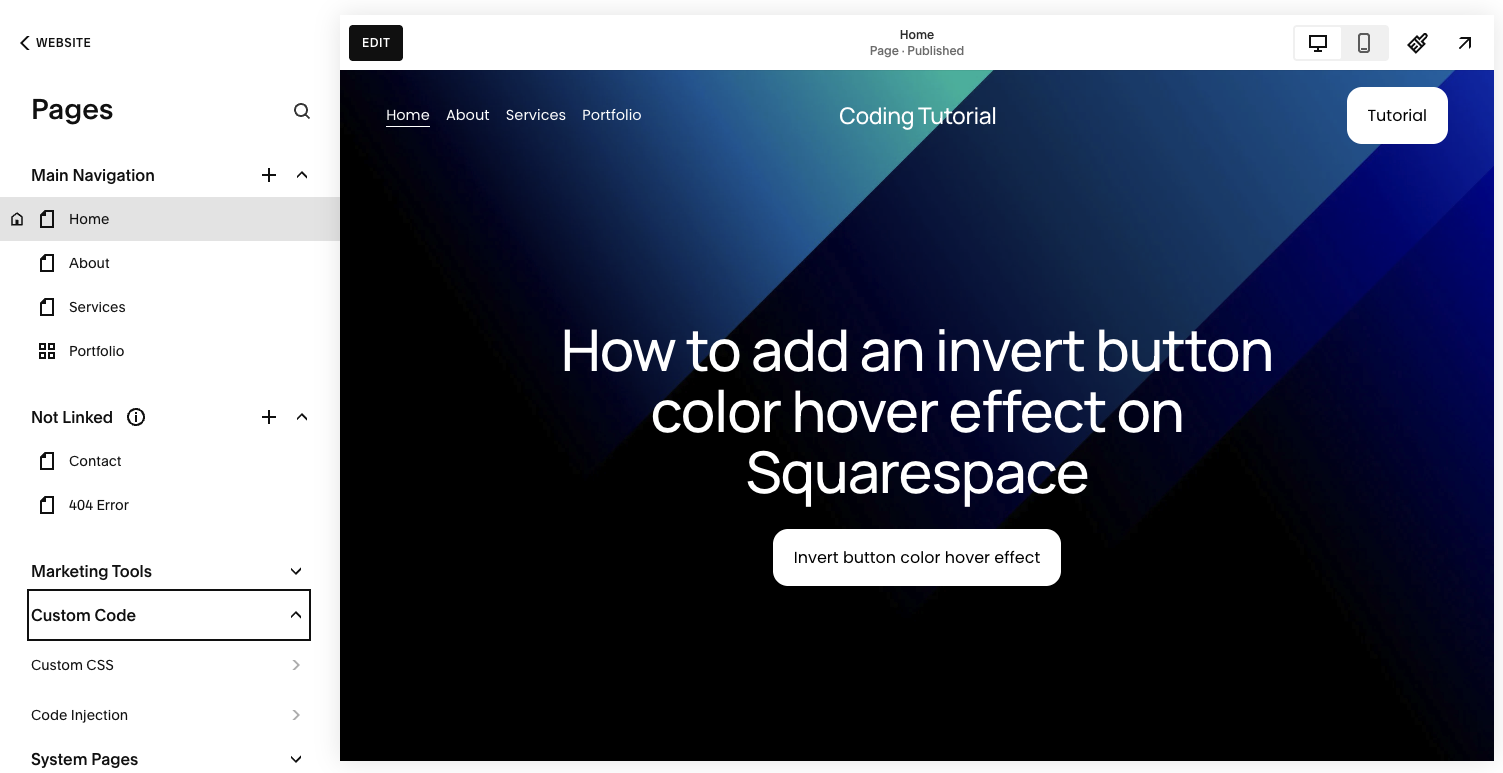
Click Pages.
Scroll down and select Custom CSS under Custom Code.
This allows you to extend native button behavior safely.
Step 2: Add the invert hover code
Paste the following code into the Custom CSS panel:
// Invert button color hover effect - Typza.com //
.sqs-button-element--primary {
transition: 0.3s;
}
.sqs-button-element--primary:hover {
filter: invert(100);
}
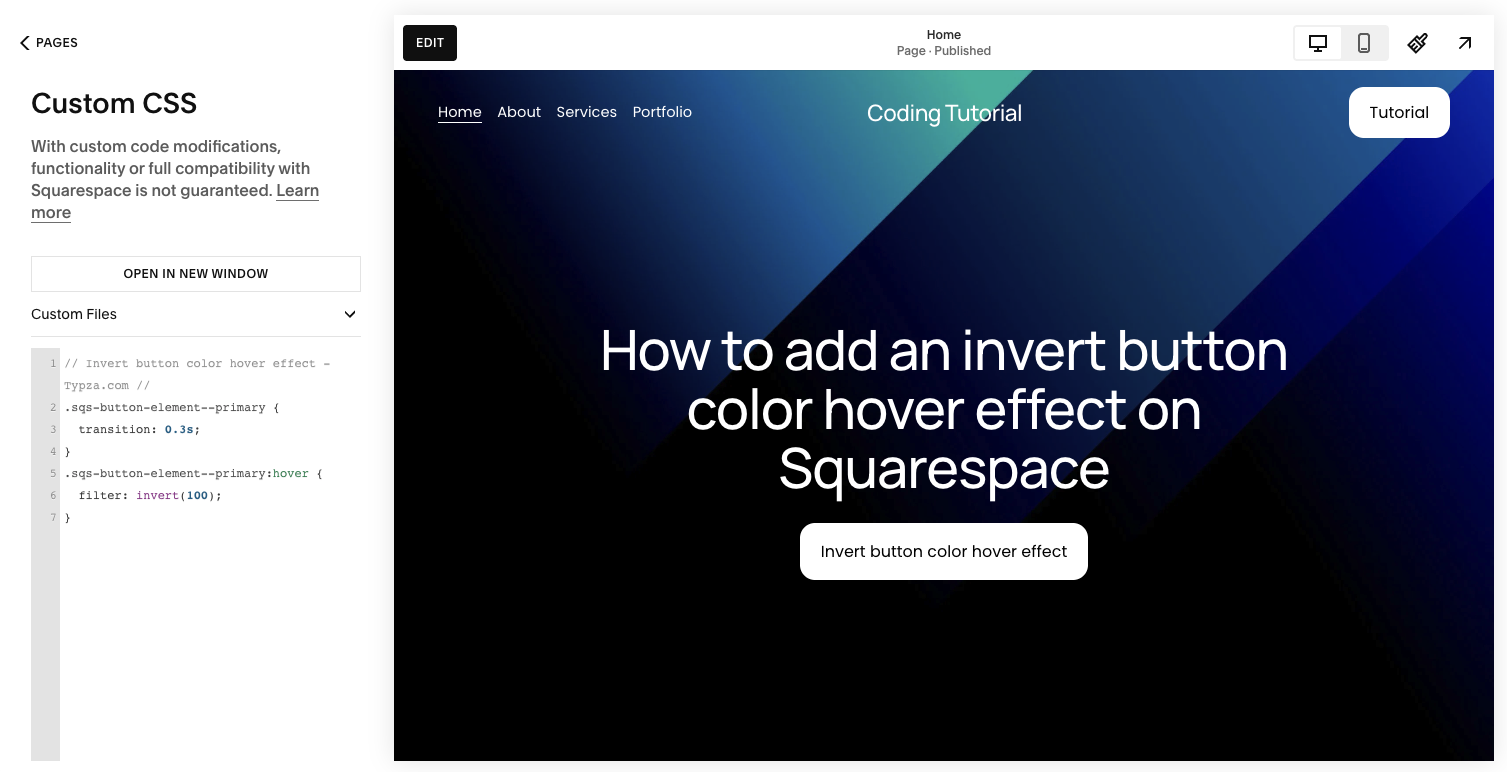
This does two things:
Applies a smooth 0.3 second transition
Inverts the button’s colors completely on hover
The transition ensures the color shift feels fluid rather than abrupt.
Step 3: Save and test carefully
Click Save, then preview your site.
Test:
Buttons with solid backgrounds
Buttons with gradient backgrounds
Buttons that contain icons
Light and dark sections of your site
Because inversion affects all colors inside the element, results may vary depending on your design.
Step 4: Evaluate readability and accessibility
After applying the invert button color hover effect, confirm that:
Text remains readable
Contrast remains accessible
Brand colors still feel intentional
The effect does not clash with surrounding elements
In some cases, a manual color swap may produce a more controlled result than full inversion.
How an invert button color hover effect works for visitors
An invert button color hover effect works for visitors by creating immediate visual contrast. When the button’s colors flip, it clearly signals a change in state, reinforcing that the element is interactive.
This type of interaction:
Captures attention quickly
Provides strong hover feedback
Differentiates primary calls to action
Adds a modern, confident aesthetic
The dramatic contrast change can increase perceived responsiveness. However, if overused, it can feel aggressive. Strategic placement on high-value actions delivers the best results.
Why use invert button color hover effect on a high-quality Squarespace site
For premium brands, motion and state changes must support positioning.
An invert button color hover effect can:
Reinforce bold brand identities
Increase visibility of key calls to action
Introduce high-contrast interaction without resizing elements
Maintain layout stability since it does not alter spacing
However, full color inversion is not always subtle. Without thoughtful planning, it may:
Distort carefully chosen brand colors
Create accessibility issues
Produce inconsistent results across different button styles
An experienced Squarespace developer will evaluate whether inversion aligns with your brand system or whether a controlled color transition would perform better.
High-quality sites are defined by consistency. Every interaction should feel intentional, not experimental.
Final thoughts
An invert button color hover effect is a bold and effective way to add interactivity to your Squarespace site. It creates strong visual feedback, draws attention to key actions, and reinforces responsiveness.
While the CSS implementation is simple, the strategic decision to use inversion requires consideration of brand consistency, accessibility, and conversion impact. For founders and product leaders focused on performance and perception, details like this should align with the broader design system.
Micro-interactions shape how your brand is experienced. When executed with precision, even a simple hover effect becomes a conversion tool rather than just a visual flourish.
Start your project
Start your project with a free discovery call and see how we can bring your vision to life.
Don’t miss these tutorials