How to add a button move on hover effect on Squarespace
Learn how to implement a button move on hover effect on Squarespace using custom CSS to create subtle motion that enhances engagement and guides user interaction.
In this tutorial:
Introduction
What is button move on hover effect on Squarespace?
How to create a button move on hover effect on Squarespace
How a button move on hover effect works for visitors
Why use button move on hover effect on a high-quality Squarespace site
Final thoughts

Start your project
Start your project with a free discovery call and see how we can bring your vision to life.
Introduction
Micro-interactions influence how users experience your website more than most teams realize. A button move on hover effect is a subtle animation where a button shifts slightly to the side when a visitor hovers over it. This small movement creates a sense of responsiveness and direction.
For founders and CMOs, these details matter. Movement signals interactivity. It draws attention to calls to action without relying on aggressive colors or oversized elements. When used strategically, motion increases clarity and reinforces hierarchy.
The key is execution. Poorly implemented hover effects can disrupt layout, misalign elements, or feel gimmicky. Done correctly, they elevate the overall polish of your Squarespace site.
What is button move on hover effect in Squarespace
A button move on hover effect is a CSS-based animation that shifts a button horizontally when a user hovers over it. Instead of scaling or changing color alone, the button physically moves, typically a few pixels to the left or right.
Common use cases include:
Highlighting primary call to action buttons
Adding subtle energy to landing page hero sections
Reinforcing directional flow toward forms or product pages
Creating modern UI movement without heavy animation libraries
This type of interaction works particularly well for brands that want motion to feel intentional and directional rather than decorative.
Need an expert to build your Squarespace website?
Book a free kick-off call with our team to discuss your project requirements in detail.
How to create a button move on hover effect on Squarespace
To add a button move on hover effect, you will use custom CSS inside Squarespace.
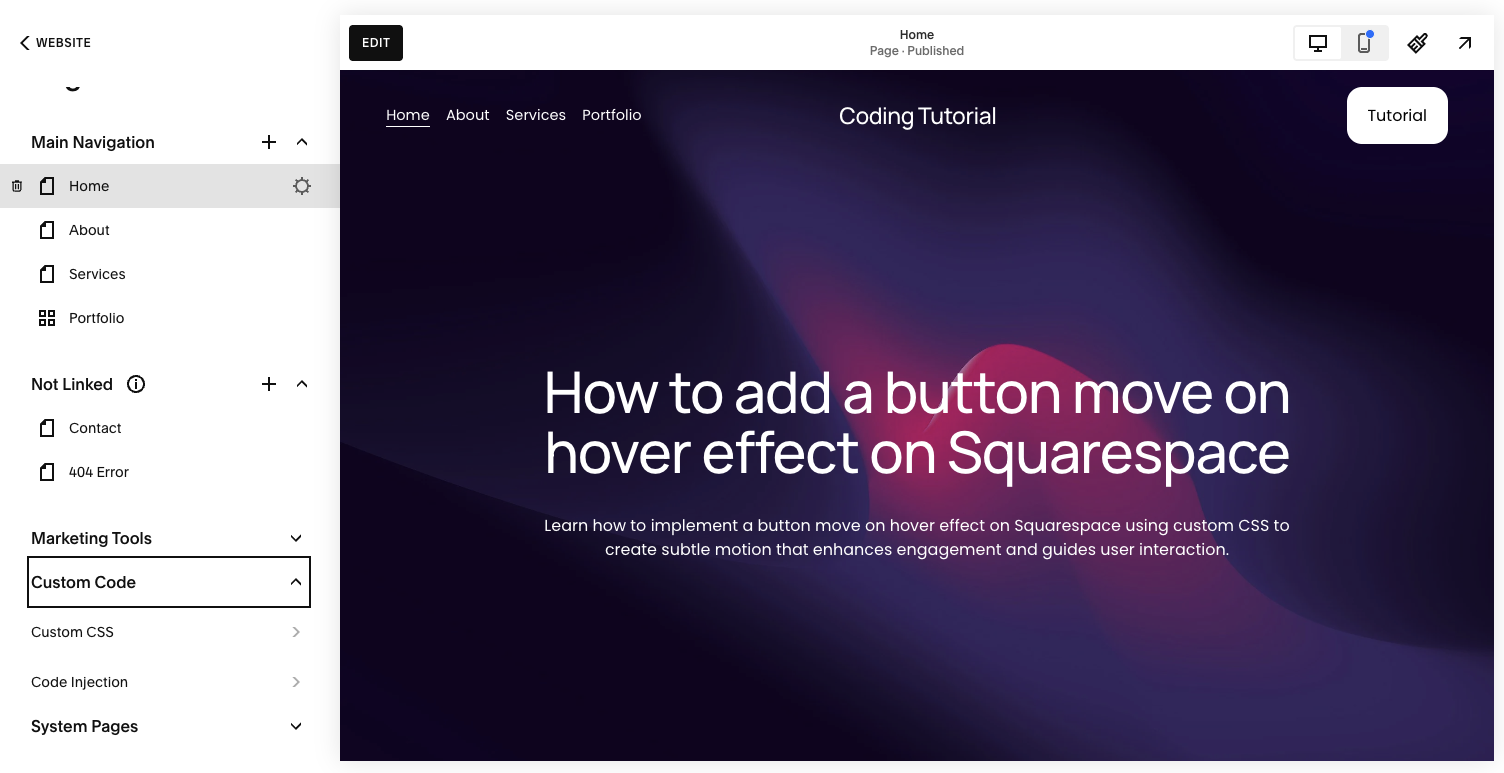
Step 1: Open the Custom CSS panel
Log into your Squarespace account.
Open your website dashboard.
Click Pages.
Scroll down and select Custom CSS under Custom Code.
This allows you to extend native button behavior safely.
Step 2: Add the hover movement code
Copy and paste the following code into the Custom CSS editor:
// Button move on hover effect - Typza.com //
.sqs-button-element--primary {
transition: 0.3s;
}
.sqs-button-element--primary:hover {
margin-left: 10px;
}
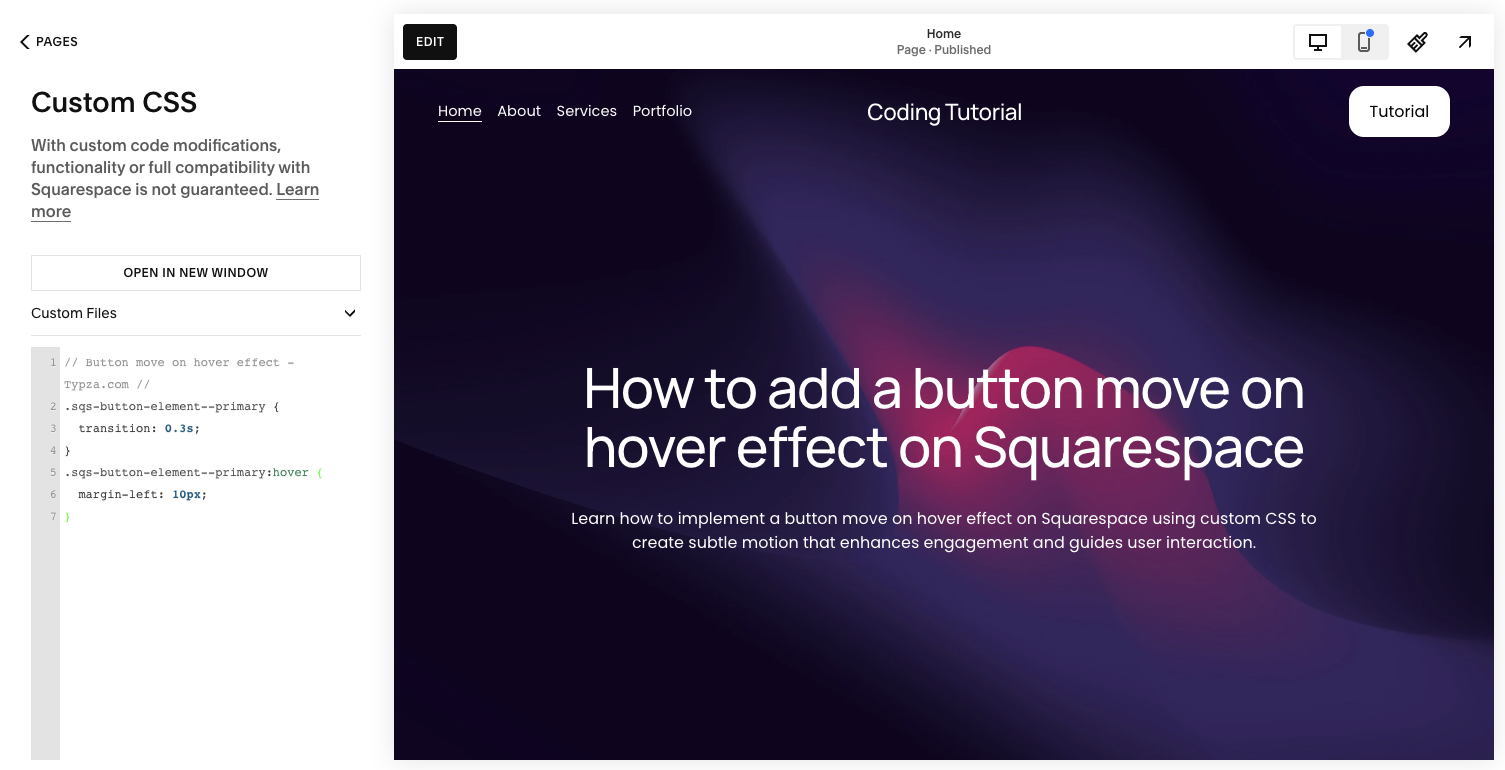
This code does two things:
Adds a 0.3 second transition for smooth movement
Shifts the button 10 pixels to the right on hover
The result is a subtle slide effect that feels responsive rather than abrupt.
Step 3: Save and review layout behavior
Click Save, then preview your site carefully.
Because this effect adjusts margin-left, it can affect surrounding elements. If buttons sit inside tightly aligned grids or flex layouts, movement may push content slightly.
Test:
Desktop layouts
Tablet breakpoints
Mobile views
On mobile devices, hover effects are typically not triggered, but spacing consistency still matters.
Step 4: Adjust the distance if needed
If 10px feels too dramatic, reduce it:
margin-left: 5px;for subtle movementmargin-left: 8px;for a balanced shift
Small adjustments often produce the most premium feel. Excessive motion can reduce perceived professionalism.
How a button move on hover effect works for visitors
A button move on hover effect works for visitors by signaling interactivity through motion. When the button shifts slightly, it captures attention and reinforces that the element is clickable.
This interaction:
Draws focus toward high-priority calls to action
Creates directional flow across the page
Improves perceived responsiveness
Makes the interface feel dynamic without being distracting
Movement also increases engagement by interrupting static layouts. When a visitor scans a page, motion naturally draws the eye. Used sparingly, this can increase click-through rates on strategic buttons.
However, the movement must feel controlled. Unbalanced spacing or inconsistent animation undermines trust and distracts from conversion goals.
Why use button move on hover effect on a high-quality Squarespace site
For serious brands, motion should support business objectives.
A button move on hover effect can:
Emphasize your primary conversion points
Create visual hierarchy without additional design clutter
Add subtle sophistication to otherwise static layouts
Reinforce a modern, responsive brand presence
But improper implementation can introduce layout shifts or misalignment. Using margin adjustments affects surrounding flow, which may cause subtle spacing inconsistencies across breakpoints.
An experienced Squarespace developer will often refine this further, potentially using transform-based movement instead of margin-based movement to preserve layout integrity.
Strategic implementation ensures motion enhances usability rather than competing with it.
Final thoughts
A button move on hover effect is a simple enhancement that can meaningfully elevate the feel of your Squarespace site. When applied thoughtfully, it guides attention, reinforces hierarchy, and improves interaction clarity.
The CSS is straightforward, but the difference between a basic animation and a conversion-driven interaction lies in execution. For founders and product leaders building serious brands, these details are not cosmetic. They shape perception, trust, and engagement.
If your website is meant to perform at a high level, even small interaction decisions deserve deliberate, expert implementation.
Start your project
Start your project with a free discovery call and see how we can bring your vision to life.
Don’t miss these tutorials