






Shopify vs Squarespace is one of the first questions anyone opening an online shop asks, and most answers online are written by someone paid to recommend one of them. So here is where we stand. We design and build on Squarespace. We also tell clients on the first call when their shop would be better on Shopify, because a store on the wrong platform costs more to fix than to start right.
This comparison is about which one suits the shop you actually run: how many products, how many channels, how big the team, and how much the look of the store matters to the sale.
What this comparison covers
We compare the two on six things: what each platform is built for, plans and fees, design, selling tools, running the store day to day, and how far each one grows with you. Prices and plan details come from the Shopify pricing page and the Squarespace pricing page, checked in November 2026.
Both companies show prices in your local currency and change them from time to time. We describe the plans and fees rather than quote a figure that may be wrong where you are, so check both pages for today's numbers.
Shopify: a commerce system first
Shopify is built around selling. The plans are called Basic, Grow, Advanced and Plus, and everything on the pricing page is about orders, payments, staff, inventory and channels. It sells online, in person through its point of sale system, on social media and marketplaces, and now in AI chats.
Its strength is depth. The Shopify App Store has thousands of apps, and the higher plans add more staff accounts, more inventory control and, on Plus, a checkout you can fully customise.
Who it suits: shops where selling is the whole business. Large catalogues, several sales channels, a team packing orders, physical stores alongside the website, or plans to sell internationally at scale.
Squarespace: a website first, with a store built in
Squarespace is built around the website. The plans are called Basic, Core and Advanced, and every one of them sells products and services. The store sits inside a site that also handles your pages, blog, bookings and memberships, with templates known for their design.
Its strength is that everything lives in one place and stays easy to edit. For most brands, variants, subscriptions, discount codes, inventory and the main payment and shipping integrations are built in, with no apps to stitch together.
Who it suits: brands where the story and the look of the products do the selling. Smaller and medium catalogues, design-led products, makers, studios and service businesses that sell some products alongside everything else.
Side by side: plans, fees and limits
Here is how the two compare on the things that show up on your bill and in your day.
| Shopify | Squarespace | |
|---|---|---|
| Plans | Basic, Grow, Advanced, Plus | Basic, Core, Advanced |
| Free trial | 3 days, then a reduced price for the first 3 months | 14 days, no card needed |
| Fee on store sales | None with Shopify Payments; 2%, 1%, 0.6% or 0.2% by plan with another payment provider | 2% on Basic, 0% on Core and Advanced |
| Team members | Staff accounts from Grow (up to 5) and Advanced (up to 15); unlimited on Plus | Up to 2 contributors on Basic; unlimited on Core and Advanced |
| Selling in person | Built in, with a paid POS Pro add-on per location | Not the focus |
| Extending it | Thousands of apps in the Shopify App Store | Built-in features, extensions and code injection on Core and up |
| Monthly cost | Higher at every level when we compared them | Lower at every level when we compared them |
Two things in the table matter more than they look.
First, the fee on sales. On Squarespace's Basic plan, every store sale carries a 2% transaction fee, which disappears on Core. If your shop sells more than a small amount each month, Core is usually the cheaper plan in practice.
Second, card processing is a separate cost on both. Each platform charges card rates for its own payment service, and those rates depend on your country and plan. Compare those too, not just the monthly price.
Pros and cons of each
Shopify, the good: the deepest set of selling tools, real point of sale for shops and markets, staff permissions for teams, multi-channel selling built in, and an app for almost anything.
Shopify, the trade-offs: costs climb as you add apps, many of which charge their own monthly fee. Themes look good, but a site that also needs strong storytelling, a blog and service pages takes more work to make feel like one brand. And with more moving parts, there is more to look after.
Squarespace, the good: design-led templates, the store and the rest of the website in one editor, lower monthly plans, no transaction fee on Core and up, and a site your team can update without a developer.
Squarespace, the trade-offs: fewer advanced commerce tools, a smaller ecosystem of extensions, and limits that a large or fast-growing catalogue with complex fulfilment will hit sooner.
Which shop suits which platform
The decision is rarely about which platform is better. It is about which one matches how your shop works.
Choose Shopify if
Selling is the main thing the website does, and you have hundreds of products or more.
You sell in person as well as online and want one stock count for both.
You have a team that needs separate logins and permissions for orders and stock.
You need apps for specific needs, such as wholesale pricing, complex bundles or subscription logic beyond the basics.
You plan to sell across several countries with local pricing.
Choose Squarespace if
The product is easier to sell when people see it in context and understand the story behind it.
The shop is part of a wider site with services, a blog, bookings or a portfolio.
Your catalogue is small to medium and you want to manage it yourself.
You want lower running costs and fewer apps to pay for and keep updated.
Design and brand matter as much as checkout features.
What we did for SonicWave Audio
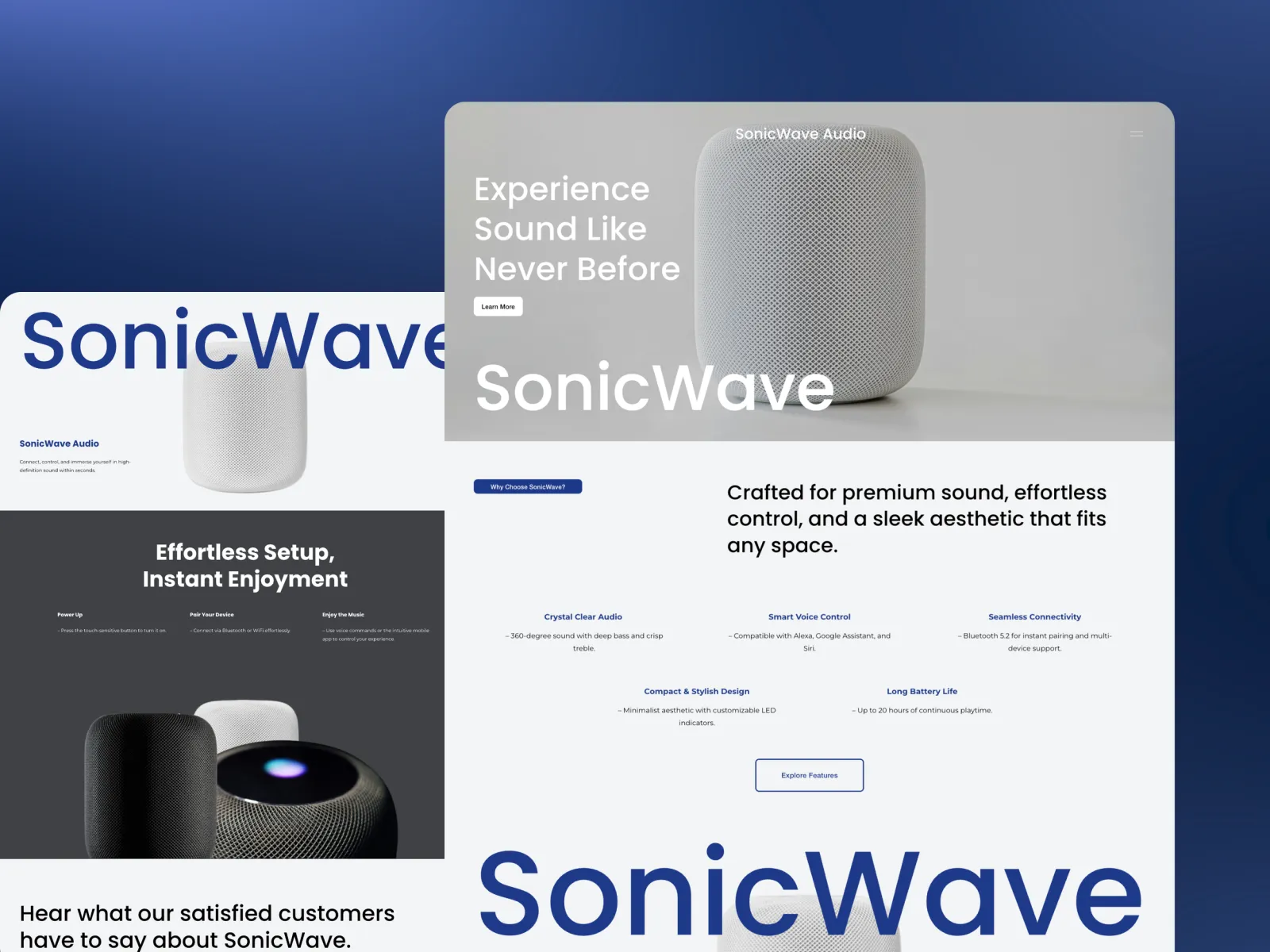
SonicWave Audio sells premium speakers and sound systems, which is a hard thing to sell online: the main benefit is something you can't hear through a screen. Most audio stores answer that with long lists of specifications, which only convince the small share of buyers who can read them.
So the store we built sells the object. Large photographs show the speakers in real rooms, so a buyer can picture one in their own space. The specifications are still there, placed as confirmation rather than as the main argument. Every product page is composed rather than templated, the phone version was designed first, and the path from interest to checkout is as short as a considered purchase allows. The team adds new products and variants themselves. The full story, built in five weeks, is in the SonicWave Audio case study.
That is the kind of shop Squarespace suits well: a focused catalogue where design does the selling. A brand with ten times the products, several warehouses and a shop counter would have been a Shopify conversation.
How to decide in ten minutes
Answer these five questions honestly:
How many products will you have in a year? A few dozen points to Squarespace. Several hundred and growing points to Shopify.
Where do you sell? Only online points to either. Online plus shop counters, markets or wholesale points to Shopify.
Who runs the store? One or two people points to Squarespace. A team with separate jobs points to Shopify.
What sells the product? Story, photography and brand point to Squarespace. Price, range and speed of reordering point to Shopify.
What else does the site need to do? A blog, services, bookings or a portfolio point to Squarespace.
If most answers point one way, you have your platform. If they split, the first two questions usually decide it.
The short answer
Shopify is the better commerce system. Squarespace is the better website with a shop in it. Most small and medium brands that sell on design and story are better served by Squarespace, with lower running costs and a site they can run themselves. Shops with large catalogues, in-person sales or a team behind them are better on Shopify, and we will say so.
Whichever you choose, the platform matters less than the store built on it. Clear product photography, honest product pages and a short checkout sell more than any feature list.
FAQ
Is Squarespace cheaper than Shopify?
When we compared both pricing pages in November 2026, each Squarespace plan cost less per month than the Shopify plan at the same level. Remember to add card processing fees, which both charge, and the cost of any paid Shopify apps you need.
Does Squarespace charge transaction fees on store sales?
Only on the Basic plan, which charges 2% on online store sales. The Core and Advanced plans have no store transaction fee. Card processing fees are charged separately on every plan.
Does Shopify charge transaction fees?
Not when you use Shopify Payments. If you use a different payment provider, Shopify adds a fee of 2%, 1%, 0.6% or 0.2% depending on your plan, on top of that provider's own charges.
Can I move my store from Squarespace to Shopify later, or the other way?
Yes. Products, customers and pages can be moved in either direction. The part that needs care is your web addresses: every old product and page URL should redirect to its new one so you keep your search rankings.
Which is better for SEO, Shopify or Squarespace?
Neither has a clear edge. Both let you set page titles, descriptions and URLs. Rankings depend far more on your product pages, content and site structure than on the platform underneath.
Can Squarespace handle a large product catalogue?
It handles small and medium catalogues comfortably, with variants, inventory, subscriptions and discounts built in. Shops with several hundred products, many locations or complex fulfilment are usually better served by Shopify.