





Contractor SEO has a reputation for being complicated and expensive, and plenty of agencies are happy to keep it that way. For most contractors, builders and construction companies, it comes down to a handful of things done properly: the right pages on your website, a complete Google Business Profile, a steady flow of reviews, and content that answers what people ask before they call.
This guide covers what matters, in the order we would fix it, and what you can safely ignore. It is written for general contractors, home builders, remodelers and construction firms, whether you work in one town or across a region.
Why search matters for contractors and construction companies
Most people who need a builder or contractor start in one of three places: a recommendation, a Google search or, increasingly, an AI tool. Even the ones who get a recommendation usually search your name before they call. So search does two jobs for you. It brings in people who have never heard of you, and it confirms you to the people who have.
The second job is easy to forget. A homeowner told about you by a neighbour will look you up. If they find a thin website, an incomplete Google profile and three reviews from 2019, the recommendation loses its weight. Good SEO for construction companies is partly about being found and partly about not losing the jobs you were already going to get.
Google is open about how local results work. Its guide to improving your local ranking says they are mainly based on relevance (how well you match the search), distance (how close you are to the searcher) and prominence (how well known you are, including links and reviews). You can't change distance. Everything in this guide is about relevance and prominence.
What contractor SEO actually involves
There are four parts, and they support each other:
Your website. The pages that say what you do and where, written so both people and search engines understand them.
Your Google Business Profile. The listing that shows in the map results, with your category, service area, photos and reviews.
Your reputation. Reviews on Google and elsewhere, plus mentions and links from local sites, suppliers and associations.
Your content. Pages and articles that answer what buyers ask, such as how long a build takes, what a permit involves or what affects the price.
None of these needs special software. They need time and consistency, which is exactly what a busy contractor has least of. That is why it helps to know which parts move the needle first.
What good looks like
A contractor with strong search presence usually has:
A separate page for each main service, not one page listing everything.
Pages for the towns or areas they want work in, each with something specific to say about that area.
A complete, verified Google Business Profile with the right primary category and recent photos.
Reviews arriving every month, with replies to each one.
Project pages showing real work, with the location and the type of job.
A fast website that works properly on a phone, because that is where most people search for a tradesperson.
If your site has the first and the last of those, you are ahead of many competitors already. Most contractor sites we see have one services page, a gallery with no words and a contact form.
What drives results, in order of impact
If you can only do some of this, do it in this order.
1. A page for every service you want to be found for. Google matches searches to pages. If someone searches for "kitchen remodel" and your site only has a page called "Services" with kitchens mentioned in a list, you are asking Google to guess. A page called "Kitchen Remodeling" that explains what you do, shows kitchens you have built and answers common questions gives it a clear match.
2. Your Google Business Profile, complete and verified. For local searches, the map results often appear above everything else. Google's guide says businesses with complete and accurate information are more likely to show up. That means the right primary category, your hours, your service area, a real description and photos of your work. If you don't serve customers at your address, Google's help page on managing service areas says to remove the address and set service areas instead, up to 20 of them.
3. Reviews, steadily. Google says more reviews and positive ratings can help your local ranking, and replying to them shows you value the feedback. A steady flow matters more than a burst. Ask every happy client, at the moment they are happiest, usually at handover. Our post on contractor website reviews covers where to show them on your site so they win calls too.
Area pages and project pages
4. Area pages, done properly. If you work across several towns, a page for each main area helps, but only when each page says something specific: projects you have done there, local permit notes, typical house types. A list of town names on one page does not work, and nor do twenty copies of the same page with the town swapped. We go through how to build them in our guide to contractor service area pages.
5. Project pages with words. A gallery of photos tells Google very little. A project page with a short write-up (the brief, the location, the scope, the result) tells it what you do and where you do it, and gives buyers something to read.
How to find the right searches for your business
You don't need an expensive keyword tool to start. Begin with what clients actually say on the first call. If they say "loft conversion", "garage conversion" or "home extension", those are your page names. Write them down for a month.
Then look at what Google suggests as you type your main services, and at the "People also ask" questions on the results page. Those questions are content ideas, and many of them belong in an FAQ on the matching service page.
Two kinds of search are worth separating:
Service searches, such as "custom home builder" or "commercial roofing contractor". These need service pages.
Question searches, such as "how long does it take to build a house" or "do I need planning permission for an extension". These suit articles or FAQs, and they bring in people earlier in the decision.
Service searches usually bring the enquiries. Question searches bring people who will enquire later, and they help you show up in AI answers, which tend to quote clear, direct answers to questions.
Building a contractor website that ranks
The website is the part you control completely, so it is where most of the work goes.
Questions to ask before you hire anyone for SEO
Plenty of contractors pay a monthly SEO fee and can't say what it buys. Before you sign anything, ask:
What will you change on my website, and when? Real SEO work changes pages: new service pages, better titles, area pages, project write-ups. If nothing on the site changes, little will happen.
Which searches are you targeting, and why those? You should see a list tied to the work you want, not a generic list of industry terms.
How will we measure it? Enquiries and calls matter more than rankings. Ask how they will connect the two.
Who owns the work? Pages, content and your Google profile should be in your name. If you part ways, you keep everything.
What can't you promise? An honest answer includes "a specific position by a specific date". Nobody can promise that, and Google says there is no way to pay for a better local ranking.
If the answers are vague, the work probably will be too.
The technical basics, briefly
Google's own SEO starter guide is honest that there are no secrets that will automatically rank a site first. Most of what it covers comes down to helping search engines find and understand your pages. For a contractor site, that means:
A clear title for every page. "Kitchen Remodeling in Austin | Company Name" says more than "Services".
Headings that describe the page. One main heading with the service, then sections for what is included, the process, projects and questions.
Fast pages on a phone. Compress your project photos. A gallery of uncompressed images is the most common reason contractor sites are slow.
Structured data. Code that tells search engines your business name, type, area and services in a format they read reliably. Schema.org even has a type for it, GeneralContractor, under home and construction businesses. Our post on schema markup for contractor websites explains which types to use.
Redirects when pages move. If you rebuild your site, every old address must point to its new page, or you lose what the old pages had earned.
Common contractor SEO mistakes and how to avoid them
These come up on almost every contractor site we look at.
One page for all services. It feels tidy, but it can only compete for one search. Split it into a page per main service.
Town-swapped area pages. Twenty identical pages with a different town name in each are easy to spot, for Google and for buyers. Fewer, better pages beat many thin ones.
Galleries with no words. Photos sell the job to people, but words tell search engines what the job was. Add a few sentences to each project.
A Google profile set up and forgotten. Add photos as you finish jobs, keep hours current and reply to every review. An active profile looks like an active business.
Chasing rankings instead of enquiries. Ranking first for a term nobody in your area searches is worth nothing. Track calls and form enquiries, and ask new clients how they found you.
Writing for search engines, not people. Pages stuffed with "best contractor near me" read badly and convert worse. Write for the homeowner reading on their phone at night. That is what Google is trying to reward anyway.
Ignoring the process questions. Most people delay contacting a builder because they are worried about timelines, budgets and communication, not because they doubt the photos. Pages that explain your process answer those worries and give search engines more to understand.
How AI tools fit in
More people now ask ChatGPT, Google's AI answers or similar tools for contractor recommendations. These tools draw on the same signals: clear pages that say what you do and where, structured data, reviews and direct answers to common questions. A site built well for search is most of the way to being built for AI answers too.
The extra step is writing answers plainly. A short, factual paragraph that answers "how long does a kitchen remodel take" is easier for an AI tool to quote than a page of sales copy. We go deeper in how contractors get recommended by AI tools.
How Pinnacle Homes approached it
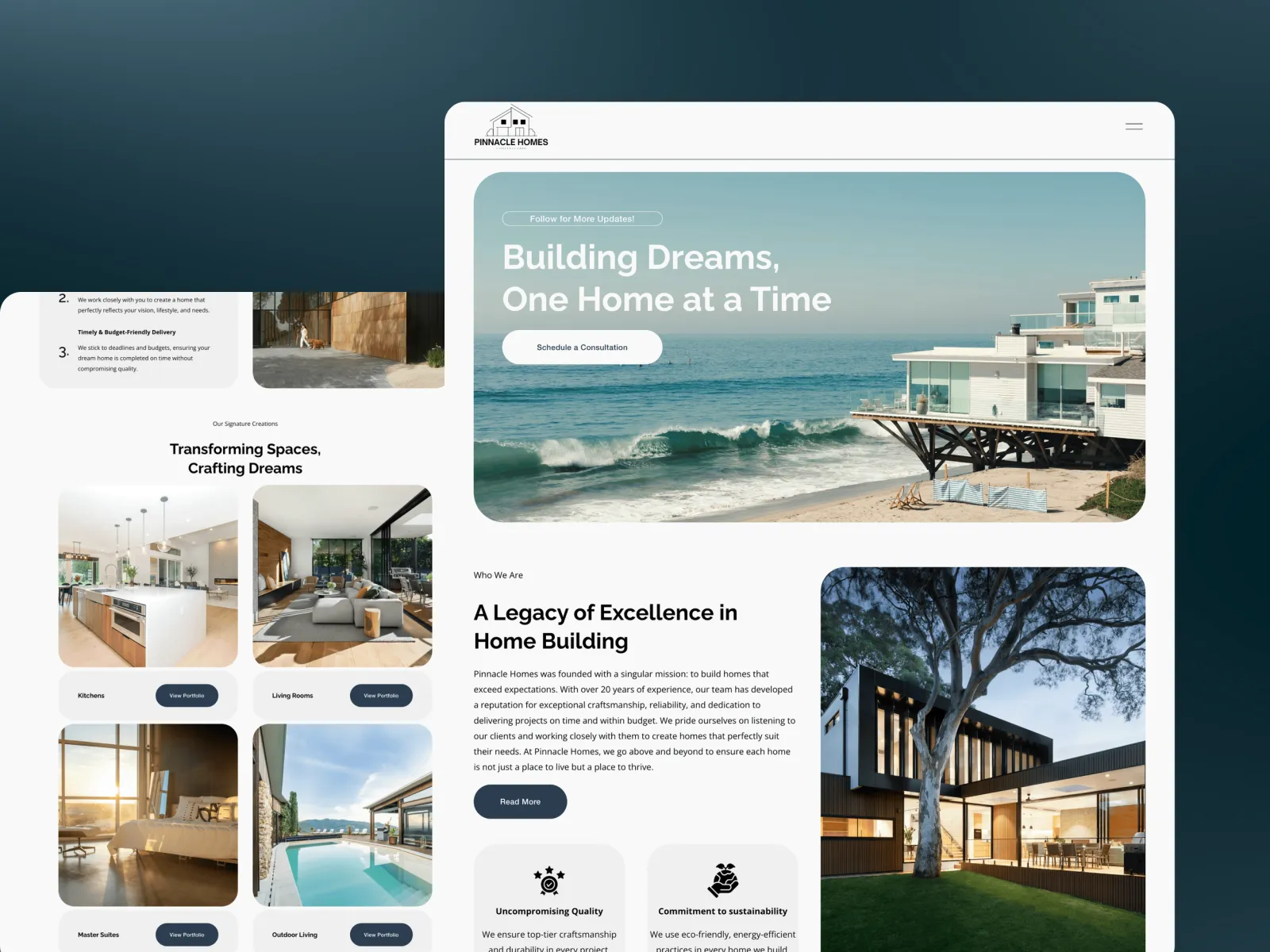
Pinnacle Homes builds luxury homes on high-value residential projects. Like most builders, the obvious move was to lead with beautiful photography. But commissioning a home is one of the biggest decisions a person makes, and the fear that delays an enquiry is about process: will it run late, will it run over, will anyone answer the phone in month seven.
So the site we built leads with the finished work and then answers the process straight away: what the stages are, what happens at each one, and what the client handles versus what Pinnacle handles. For search, it was structured around the searches people actually run when planning a build in a specific area, rather than generic industry terms. There are separate paths for people ready to build and for those still exploring, and the team adds new projects themselves as they finish.
The result is enquiries from people who already understand the process and the commitment. It went live four weeks after kick-off, including all the copywriting. The full story is in the Pinnacle Homes case study.
Where to start this month
If you do nothing else this month, do these three things:
Complete and verify your Google Business Profile. Right category, service areas, hours, a description in plain words and ten photos of recent work.
List your main services and check each has its own page. If not, write the page for your most profitable service first.
Ask your last five happy clients for a review. Send a direct link and reply to each review when it arrives.
Then add one project write-up a month. Within a year you will have a site that shows what you do, where you do it and what clients say about it, which is most of what contractor SEO is.
Conclusion: steady beats clever
Search for contractors rewards the steady, unglamorous work: a page for each service, a profile that is complete and active, reviews every month and real projects described in plain words. There are no tricks that replace it, and anyone selling one is selling you something else.
If you build your site this way, you also build it for the people reading it. That is the point. The pages that rank well for contractors and construction companies are the same ones that answer a nervous homeowner's questions before they pick up the phone.
Related reading:
FAQ
How long does contractor SEO take to work?
Changes to your Google Business Profile and new reviews can help within weeks. New service and area pages usually take a few months to settle in search results, longer in competitive cities. Nobody can honestly promise a position or a date.
Do I need a separate page for each town I work in?
Only for the areas you most want work in, and only if each page has something specific to say, such as projects you have done there. A few strong area pages work better than many near-identical ones.
Is SEO for construction companies different from SEO for contractors?
The foundations are the same: service pages, a complete Google profile, reviews and project pages. Commercial construction firms often target fewer, more specific searches and rely more on project case studies and sector pages, such as healthcare or industrial builds.
Should a contractor pay for Google Ads instead of SEO?
They do different jobs. Ads bring calls as long as you pay, and they suit a quiet month or a new service. SEO builds visibility that keeps working. Many contractors use both, with ads while the website and profile are being built up.
What is the most important part of local SEO for contractors?
A complete, verified Google Business Profile with steady reviews, linked to a website that has a clear page for each service. Google says local results are mainly based on relevance, distance and prominence, and those two things cover relevance and prominence.
Can I do contractor SEO myself?
Much of it, yes. Completing your Google profile, asking for reviews and writing project pages need no special skills. The website structure, technical setup and redirects are where most contractors bring in help, especially when rebuilding a site.